Social Listener
Esta página aún no está disponible en tu idioma.
Social Listener turns X (Twitter) into a live signal source. Track mentions of your brand, monitor keywords your buyers use, and surface high-intent posts (“just launched”, “looking for a CRM”, etc.) inside a daily inbox. Author handles are resolved to contacts in your CDP so signals flow into My Desk decisions and Sequencer drafts.
How It Works
- Open Signals → Social - no setup needed, graph8’s shared X API works out of the box
- Create one or more listeners (Brand / Keyword / Competitor / Engagement / User)
- The worker polls X every 10-30 minutes, classifies posts, and routes matches into the right tab
- Optionally connect your own X Developer App in Settings → Integrations for a higher quota (see BYO below)
Listener Types
| Type | What It Does | Default Poll |
|---|---|---|
| Brand | Tracks mentions of your brand, product names, and domain. Auto-builds the query from your brand snapshot. | 10 min |
| Keyword | Free-form X query syntax with filters (language, min followers, exclude replies). | 10 min |
| Competitor | Tracks mentions and activity around a named competitor so you can spot their customers and prospects. | 10 min |
| Engagement | Keyword listener with intent operators baked in (“just launched”, “looking for”, “frustrated with”). Routes matches to the Engagement Inbox sorted by classifier score. | 15 min |
| User | Polls a specific X user’s timeline. Useful for tracking key prospects, partners, or competitors. | 30 min |
Shared mode vs BYO mode
graph8 supports two auth models for the X API and picks the right one automatically per org:
| Mode | Who pays X | When to use |
|---|---|---|
| Shared (default) | graph8 pays X, bills you graph8 credits per post-read | Out-of-the-box for every org. No setup required. Capped per-month at the graph8 shared quota. |
| BYO (opt-in) | You pay X directly | Higher quota, no graph8 markup on X usage. Recommended once you exceed the shared cap or want X billing in your own account. |
Both modes are TOS-safe: tweet text is stored only within your org row, never indexed cross-tenant.
Setup: Use graph8’s shared X API (default)
There is nothing to set up. Just visit Signals → Social Listener and create your first listener. graph8 polls X using its shared Developer App and bills your org graph8 credits per post-read (see Pricing below).
Setup: Connect your own X Developer App (BYO upgrade)
When you want the full per-app quota or want X to bill you directly:
- Go to developer.x.com and create a Developer Project + App
- In the App’s Keys and Tokens tab, copy the API Key and API Secret (graph8 derives the Bearer Token automatically via the OAuth2 Client Credentials grant)
- In graph8, go to Settings → Integrations and find the X API card
- Click Connect your own X Developer App, paste API Key + API Secret, click Test connection
- Once verified, click Connect to save
graph8 stores the credentials encrypted (Fernet) and uses them only for Social Listener polling. If you later disconnect your BYO app, graph8 automatically falls back to shared mode and re-activates any listeners that were paused.
Your First Listeners (auto-seed)
If you have no listeners yet, the page shows a first-run hero with one-click auto-seed. graph8 reads your Studio docs (brand snapshot, competitors, ICP keywords) and proposes a starter set:
- One Brand listener from your brand name, product names, and domain
- A Competitor listener for each competitor it finds
- Keyword listeners for your tracked terms
- A couple of Engagement listeners with intent operators baked in
Review the proposed listeners, then create them in one click. You can refine any query, filter, or poll cadence afterward, or create listeners manually instead.
The Engagement Inbox
The Engagement Inbox is the daily-action surface. It shows matched posts from all your engagement-type listeners, sorted by classifier score (highest intent first).
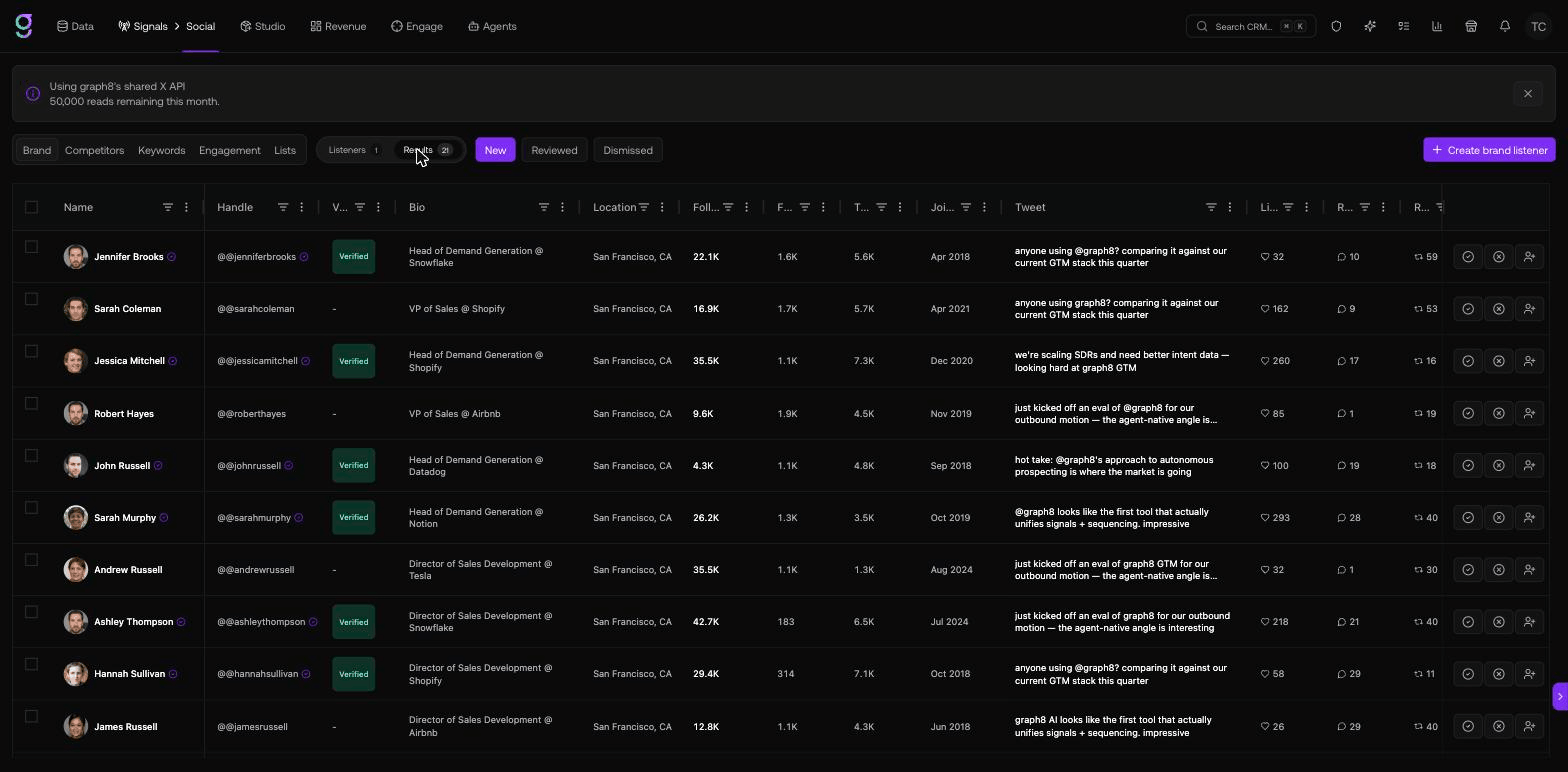
Each match shows:
- Author info (avatar, handle, verified, follower count)
- The full post text
- Engagement metrics (likes / replies / reposts / views)
- A classifier badge (showcasing / asking / complaining / announcing) and a 0-100 intent score
- Resolved contact link if the author is already in your CDP
Actions per row:
| Action | What It Does |
|---|---|
| Mark reviewed | Acknowledges the post; removes from “New” filter |
| Dismiss | Hides the post from future runs of the same query |
| Reply on X | Opens a pre-filled reply to the post on x.com |
| Save as contact | Creates a contact from the author profile if not already in your CDP |
| Add to list | Adds the author (resolving or creating the contact) to a list |
| Enroll in sequence | Enqueues the resolved contact into a Sequencer sequence |
| Open in X | Opens the post on x.com |
Source Lists
The Lists tab turns a graph8 list into a tracked source: graph8 watches the X handles of the contacts on that list and pulls their posts. The list grid shows each list’s status, contact count, how many handles are being tracked, how many contacts have no X URL, whether the list is dynamic, and when it last synced. You can add a list even before any of its contacts have X handles - tracking starts as soon as handles are filled in.
Signals from Every Matched Author
Social Listener now creates a signal for every matched author, not just authors already in your CRM. When a post matches a listener:
- If the author is a known contact, the signal attaches to them directly.
- If not, graph8 stub-creates a contact, adds them to a per-org Social Signals list (which kicks off auto-enrichment), and still fires an org-level signal.
This means broad listeners surface intent even from accounts you have never seen before.
Contact Capture Settings (admin)
Admins control this from Settings → Signals → Social. The Contact capture panel has:
- A master Auto-create contacts toggle
- Per-listener-type rules: enable/disable capture, a minimum follower floor, and an only when classified option (only capture authors whose post the classifier scored as intent)
Use these to keep low-quality or high-noise listeners from flooding your CDP with stub contacts.
The Contact Social Tab
When a contact has an X (Twitter) URL, a Social tab appears on their detail panel showing a read-only feed of the matched posts graph8 has captured for them. You can add or edit a contact’s Twitter / X URL from the contact overview, and Twitter URL columns are available on the contacts and companies grids.
Pricing Model
Costs differ by auth mode:
| Charge | Shared mode | BYO mode |
|---|---|---|
Post read (/2/tweets/search/recent, /2/users/:id/tweets) | 7 credits per post returned | 0 graph8 credits - your X bill |
User lookup (/2/users/by/username/:name) | 14 credits per lookup | 0 graph8 credits - your X bill |
| Post classification (per matched post) | 1 credit | 1 credit |
| Brand-query auto-build (one-off, cached) | 5 credits | 5 credits |
Under shared mode, graph8 pays X ($0.005 per read, $0.010 per lookup) and bills your org graph8 credits at a 40% margin. Under BYO mode, you pay X directly at the same rates and graph8 only bills for classifier + brand-query passes.
The X Spend Banner inside the Social Listener page shows your running monthly X spend alongside graph8 credit burn. When usage crosses 80% of your configured cap, the banner turns into a warning; at 100%, listeners auto-pause until the next cycle. Shared-mode listeners also auto-pause when either graph8’s global shared quota or your per-org shared cap is reached - upgrade to BYO to lift those caps.
TOS-Safe Storage
graph8 keeps tweet text strictly scoped to your org row. We never index post text cross-tenant, never redistribute it, and never share it between customers. See the internal compliance doc for the full row-scoping architecture.
Related
- Intent Tracking → - first-party + web intent signals on resolved contacts
- Sequencer → - send replies / outbound to matched authors